
If you’re reading this, your gallery link just landed in your inbox and you are probably already on your phone scrolling through your photos with your heart in your throat. 🥹
That’s exactly how it’s supposed to feel.
But before you screenshot anything, before you share anything, before you close the tab and tell yourself you’ll come back to it later — please read this first. I put this together because I want your photos to actually end up in your hands, on your walls, and backed up somewhere safe. Not buried in your camera roll next to three hundred screenshots and a blurry photo of a grocery list.
This is everything you need to know about your Pic-Time gallery, how to download your photos properly, how to order prints, and why you have a deadline you actually need to pay attention to.
First Things First — Please Don’t Screenshot
I know it’s tempting. You’re scrolling, something catches your eye, your thumb moves before your brain does and suddenly you’ve got a screenshot saved. I get it completely.
But here’s what a screenshot actually gives you: a low resolution, compressed version of your photo with a status bar across the top and your notification icons baked in. Print that and it’s going to look soft and blurry. Post it and it’s going to look nothing like the original. It’s the difference between a copy of a copy and the real thing.
Your gallery has a download button. It takes about three extra seconds. And what you get is the full resolution, fully edited, professionally color graded image I actually delivered to you. That’s the one worth keeping. That’s the one worth printing. That’s the one that’s going to look beautiful on your wall twenty years from now.
Please use the download button. Your future self will thank you. 📲

How to Download Your Photos
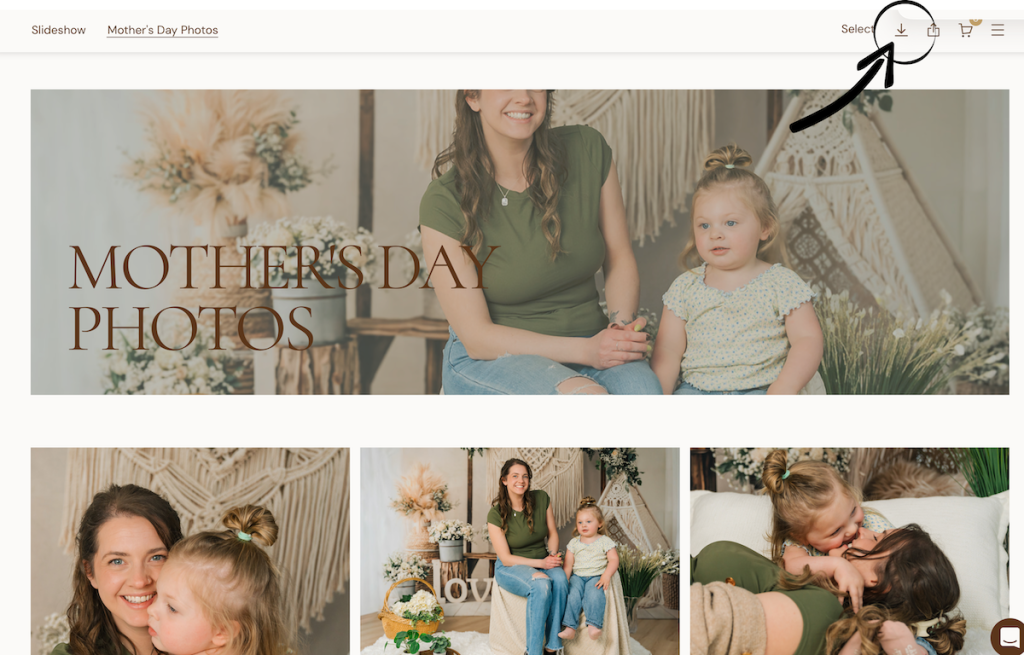
When you open your gallery link from Pic-Time, you’ll land on your personal gallery page. Here’s exactly what to do:
To download everything at once, look for the download button — it’s usually in the top right corner of your gallery. Click it and choose to download all photos. Pic-Time will package everything into a zip file and send it to you. Open the zip file and save those photos somewhere you’ll actually be able to find them — a dedicated folder on your computer, Google Drive, iCloud, an external hard drive. Somewhere real. Not just your downloads folder where things go to disappear forever.
To download individual photos, open the image you want, look for the download icon, and save it directly to your device. This works great on phones too — open the photo, tap the download icon, and it saves directly to your camera roll at full resolution.
If you run into any trouble with downloading, reach out to me directly through your HoneyBook portal and I’ll walk you through it.
Your Early Bird Discount — and Why You Shouldn’t Wait on It
Here’s something I want you to know right now: your gallery comes with an Early Bird discount that is only available for the first 10 days after delivery. During that window, everything in my print store is 25% off — prints, canvases, books, gallery boards, all of it.
After 10 days the discount disappears. After 30 days your gallery expires entirely.
I’m not telling you this to pressure you. I’m telling you because I have seen too many families plan to “come back to it later” and then later never quite arrives. The discount is there because I genuinely want you to print your photos while the excitement is fresh and the moment is still close. Use it. 🎁
What to Order — and Why Prints Actually Matter
I know we live in a world where everything lives on our phones and screens. But I want to say something honest here: digital files alone are fragile. Phones get lost. Hard drives fail. Cloud services change their terms. Platforms shut down.
A print on your wall cannot be corrupted by a software update. A photo book on your coffee table does not require a password. A canvas above your couch will still be there when your kids are grown and bring their own kids home to see it.
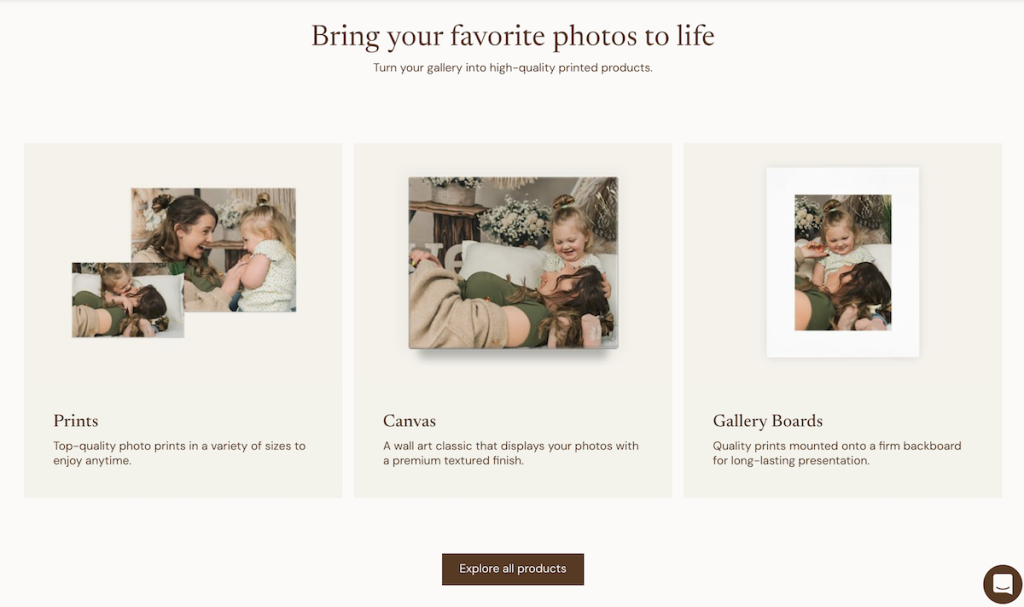
I set up my print store specifically with families in mind. Everything available through your gallery is printed by Bay Photo Lab, one of the best professional print labs in the country. The quality is genuinely different from anything you’d get at a drugstore or a big box retailer. These are heirloom quality products made to last.
Here’s what I’d suggest starting with if you’re not sure where to begin:
A wall canvas or gallery board for the photo that stopped you in your tracks when you first opened the gallery. You know the one. The one you immediately sent to your mom or your husband. That one belongs on a wall.
A fine art print in 8×10 or 16×20 for a frame you already have or one you’ve been meaning to fill.
A hardcover photo book if you want something the whole family can hold and flip through together. These are the things kids actually ask to look at. Not the folder on your computer — the book on the shelf.
Your Gallery Expires in 30 Days
I want to be really clear about this because it catches people off guard and I don’t want it to catch you off guard.
Your gallery is available for 30 days from delivery. After that it expires and the link will no longer work. This is not a glitch — it’s how my system is set up intentionally, both to protect your privacy and to keep my storage manageable.
What this means for you practically: don’t wait until day 28 to download your photos and place your print order. Download everything within the first few days of receiving your gallery. Place your print order while the Early Bird discount is still active. And if you need more time for any reason, just reach out — I am always happy to work with you.
You’ll receive reminder emails as your gallery approaches expiration so it won’t sneak up on you. But the best plan is to just handle it early and not have to think about it again.
Back Up Your Photos — Seriously
Once you’ve downloaded everything, please back it up somewhere beyond just your phone camera roll. A few options that work well:
Google Photos or iCloud will automatically back up anything you save to your camera roll, which is a great start. For an extra layer of security, save a copy to Google Drive or Dropbox as well. If you have an external hard drive at home, copy them there too.
I keep your files for a period of time after delivery but I cannot guarantee permanent storage on my end. Your gallery is your gallery — treat it like the irreplaceable thing it is. 💛Pic-ti
Frequently Asked Questions
What if I can’t figure out how to download?
Reach out through your HoneyBook portal and I’ll walk you through it step by step. It’s genuinely easy once you know where to look.
Can I share my gallery with family members?
Yes! Pic-Time has a share feature built right into your gallery. You can send the link to grandparents, aunts and uncles, anyone you want to be able to view and even order their own prints directly. They’ll have access to the same store you do.
What if I want to order prints after the Early Bird window closes?
You can still order prints after the 10 day discount window — just at regular store pricing. And you can still access your gallery and place orders up until the 30 day expiration date.
What if I miss the 30 day window entirely?
Reach out to me directly. I’ll do my best to help but I cannot make any guarantees once a gallery has expired, which is exactly why downloading everything early is so important.
How long does print delivery take?
Bay Photo Lab is fast — most orders ship within a few business days and arrive within a week to ten days depending on your location. Plan accordingly if you’re ordering for a specific occasion or holiday.
Can my family members order prints from my gallery?
Yes — when you share your gallery link with family, they can browse and order directly. Orders ship straight to them. You do not need to be involved in the transaction at all.
I want to learn more about what happens during the session itself — where do I start?
I have a full post walking through what to expect when you book an in-home family session and another one on Family Film or Family Photos? How to Actually Decide. Both are worth a read before your session day.
Ready to Dive In?
Your gallery link came from Pic-Time — check your inbox if you haven’t opened it yet. Download your photos, grab your favorites for the walls, and use that Early Bird discount before it disappears.
And if you haven’t booked yet and you’re just here doing research — hi, I’m Emily! I’d love to talk about what a session for your family could look like.